NBP Retouch Tools
NBP CMX3 Panel for Photoshop
NBP CMX3 Panel for Photoshop
Couldn't load pickup availability
NBP CMX3 for Adobe Photoshop
Extract a color palette from any photograph and apply it as a creative color wash in Adobe Photoshop.
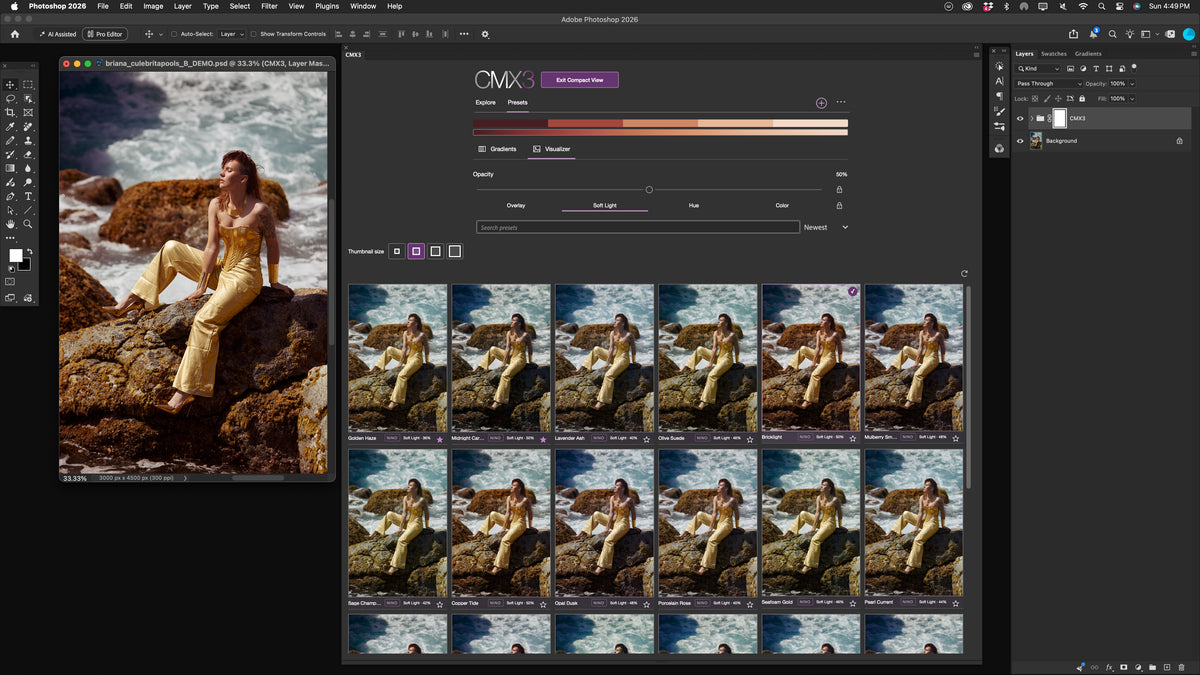
CMX3 is a color palette extraction and grading panel for Adobe Photoshop. It analyzes the colors in a photograph, extracts a palette, and lets you apply those colors back to your image as a customizable, gradient-based color wash.
It's a simple but powerful approach to creative color grading, allowing you to build cohesive color treatments using the colors already present in any photo (your own, something found online, or even a phone snapshot of colors!)
Extract your palette. Apply your color.
CMX3 makes it easy to turn the colors of virtually any photograph into a creative color treatment. Extract a palette from the image you're editing, or use an entirely different photo as your color inspiration.
Choose the maximum number of colors to extract, explore the resulting palette, and apply it to your working image as a gradient-based color wash.
CMX3 handles the color analysis, palette extraction, and gradient creation, eliminating the need to manually sample colors and build Photoshop gradients from scratch.
Fine-tune your results in real time
Once your color wash is applied, CMX3 gives you intuitive controls to adjust its appearance directly from the panel.
Adjust Hue, Saturation, and Lightness of your gradient palette using dedicated HSL sliders, experiment with Soft Light, Overlay, Hue, and Color blend modes, and fine-tune the overall strength of your color wash with opacity controls.
Use Neutral Protection to help preserve neutral areas of your image, as well as the ability to target shadows, midtones, highlights, or the entire image; control where your color grade has the greatest influence!
Additional palette blending controls let you experiment with the distribution and transitions of your extracted colors, with live visual feedback as you work.
Save your favorite palettes for future use
Found a palette you love? Save it as a preset and use it again on other photos.
Build your own collection of creative color treatments, experiment with different source images, and develop consistent looks across multiple photographs without repeating the extraction process.
Whether you're editing portraits, fashion, beauty, landscapes, or other photographic work, CMX3 offers an efficient and creative approach to color grading that begins with the colors you find inspiring.
One-time purchase. No subscriptions. No license key activation.
CMX3 requires no recurring payments, usage credits, or license key activation. Purchase it once and use it without depending on an external licensing server.
System performance: Apple silicon (M-series) Macs are recommended, although some Intel Macs are also supported (with performance hits). On either Windows and macOS, performance may vary depending on your computer's hardware, Photoshop document complexity, and available system resources.
Compatibility: Adobe Photoshop 26.x or newer, UXP support on compatible macOS and Windows systems.
Already purchased NBP CMX2? All existing CMX2 customers are eligible for a complimentary CMX3 upgrade. Download notifications have already been issued to previous purchasers. If you haven’t received yours, please check your spam folder or contact me at nbp@ninobatista.com for assistance.
Share